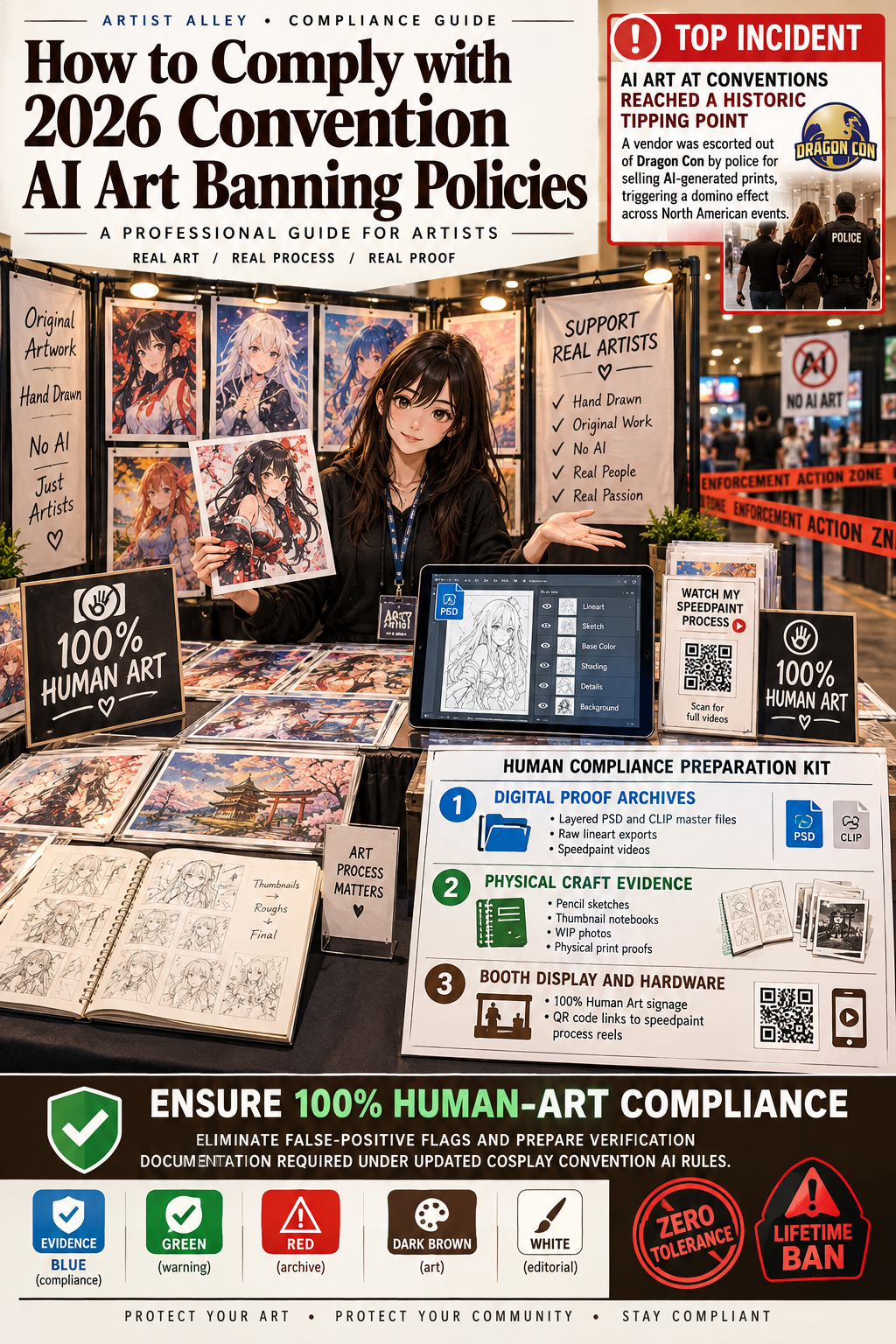
The debate surrounding AI art at conventions reached a historic tipping point when a vendor was escorted out of Dragon Con by police for selling AI-generated prints. This incident triggered a swift domino effect across North American events, leading major organizers like GalaxyCon to institute total zero-tolerance AI bans with immediate expulsion and lifetime bans for violations.
This step-by-step guide helps illustrators, print vendors, and artisans navigate 2026 cosplay convention AI art rules, conduct inventory audits, and establish verification methods to protect their booths from enforcement actions or crowd boycotts.
Tutorial Goal & Preparation Checklist
Goal: Ensure 100% human-art compliance for your Artist Alley table, eliminate false-positive flags, and prepare verification documentation required under updated cosplay convention AI rules.
┌────────────────────────────────────────────────────────────────────────┐
│                   HUMAN COMPLIANCE PREPARATION KIT                     │
├─────────────────────────────────┬──────────────────────────────────────┤
│ Digital Proof Archives          │ Layered .PSD/.CLIP master files, raw │
│                                 │ lineart exports, speedpaint videos   │
├─────────────────────────────────┼──────────────────────────────────────┤
│ Physical Craft Evidence         │ Pencil sketches, thumbnail notebooks,│
│                                 │ WIP photos, physical print proofs    │
├─────────────────────────────────┼──────────────────────────────────────┤
│ Booth Display & Hardware        │ "100% Human Art" signage, QR code    │
│                                 │ links to speedpaint process reels    │
└─────────────────────────────────┴──────────────────────────────────────┘
Equip your booth with official cosplay convention artist alley essentials.
Step 1: Analyze the Policy Catalyst (The Dragon Con Eviction)
To understand why conventions are banning AI art, creators must review how recent enforcement actions reshaped industry standards.
                       [ DOMINO EFFECT TIMELINE ]

  [ Fan Expo Toronto ]  --> Backlash over Bell corporate AI portrait booth
            │
            v
  [ Dragon Con Eviction] --> Vendor ejected with police escort; viral sign posted
            │                "#ARTBYHUMANS"
            v
  [ GalaxyCon Blanket Ban] -> Immediate zero-tolerance rule across 4+ national cons:
                             Expulsion, zero refund, lifetime ban for AI merchandise
-
The Dragon Con Incident: During the event, attendees and artists flagged a vendor booth ("Oriana Gertz Art") for selling AI-generated prints. Following a two-day staff review, security and police escorted the vendor out of the hall. Neighboring artists posted signs reading "VENDOR REMOVED FOR SELLING AI ART #ARTBYHUMANS".
-
Official Policy Language: The DragonCon AI art policy explicitly states: "No AI-generated artwork is permitted to be sold or distributed in the Artist Alley, Art Show, or Vendor Hall. Violation of the AI policy may result in immediate ejection from the convention."
-
The Industry-Wide Wave: Following the DragonCon AI art controversy, major organizers including GalaxyCon implemented strict bans prohibiting AI-generated content across all merchandise (prints, mugs, shirts, towels), backed by lifetime vendor bans.
Step 2: Audit Your Inventory Against AI Flag Risk Markers
To prevent false reporting from vigilant shoppers or neighboring booth owners, perform an inventory audit before packing your table stock.
┌────────────────────────────────────────────────────────────────────────┐
│                   INVENTORY RISK AUDIT CHECKLIST                       │
├─────────────────────────────────┬──────────────────────────────────────┤
│ Visual Anatomy Checks           │ Verify hand rendering, eye symmetry,  │
│                                 │ and consistency in line weights      │
├─────────────────────────────────┼──────────────────────────────────────┤
│ Background Integrity            │ Ensure background architecture and    │
│                                 │ light sources follow logical perspective│
├─────────────────────────────────┼──────────────────────────────────────┤
│ Third-Party Supply Chain        │ Confirm sub-contracted merchandise   │
│                                 │ (pins, acrylic stands) use human art │
└─────────────────────────────────┴──────────────────────────────────────┘
-
Review High-Risk Rendering Artifacts: Audit detailed illustrations for common AI generation visual markers: inconsistent clothing folds, merging accessory straps, asymmetrical pupil shapes, or nonsensical background linework.
-
Verify Third-Party Supplier Art: If you outsource manufacturing for acrylic charms, enamel pins, or throw blankets, verify that guest artists or manufacturers did not incorporate generative assets into the raw files.
-
Document Mixed-Media Assets: If using stock photography, textures, or 3D base models (e.g., Clip Studio Paint 3D pose mannequins), ensure you retain licensing records to prove they are non-generative tools.
Step 3: Implement Proof-of-Human-Process Systems at Your Booth
With modern artist alley AI policy enforcement relying heavily on peer reports, displaying visible proof of human authorship helps establish immediate credibility.
                     [ PROOF-OF-PROCESS WORKFLOW ]

  [ Digital Layer Archiving ]  --> Keep .PSD files accessible on a mobile device
              │
              v
  [ Process Display Signage ]  --> Add QR codes linking to 15-sec speedpaint videos
              │
              v
  [ Physical WIP Binder ]      --> Display thumbnail sketches alongside final prints
-
Maintain Digital Master Files on Site: Store layered source files (
.PSD,.CLIP,.SAI) with active edit histories on an iPad or tablet. If staff conducts a desk audit, showing togglable lineart and sketch layers provides definitive proof. -
Display Process Speedpaints: Export short 15-second time-lapse videos of your drawing process. Generate a QR code to print on your price signs or display on a mini tablet frame at your table corner.
-
Integrate Physical Sketchbooks: Display raw pencil sketches, inked lineart proofs, or thumbnail concept notebooks alongside finished prints. Physical artifacts build trust with shoppers and staff.
Troubleshooting & Emergency Protocols for Vendor Audits
Even legitimate human creators can face questions under strict AI art policy at anime conventions. Use these protocols to resolve concerns quickly:
| Issue / Scenario | Immediate Action Protocol | Prevention Strategy |
| A attendee or neighbor accuses your print of being AI | Remain calm. Offer to show the layered master file or time-lapse video directly on your tablet. | Keep process videos loaded on your device before the exhibit floor opens. |
| Convention staff arrives for an official booth audit | Cooperate fully. Present your layered .PSD files, sketch histories, and raw vector outlines. |
Keep digital source files organized in a dedicated "Audit Proofs" cloud folder. |
| A third-party manufacturer sent altered artwork | Pull the affected inventory item off your display grid immediately. Contact staff to clarify the issue. | Request vector source files and raw progress shots from all freelance collaborators. |
Conclusion & Strategic Recommendations
The shift toward strict AI art ban at conventions reflects an industry commitment to protecting human craftsmanship in Artist Alley spaces. By conducting thorough stock audits, archiving layered files, and displaying process videos, creators can ensure full compliance while building stronger trust with event attendees.
Preparing for your next event? Explore our comprehensive selection of cosplay convention artist alley essentials to elevate your display setup.


Hinterlasse einen Kommentar
Diese Website ist durch hCaptcha geschützt und es gelten die allgemeinen Geschäftsbedingungen und Datenschutzbestimmungen von hCaptcha.